VoClone: AI Voice Changer
- 4.2
- Rating
- 100.00K
- Installs
- Free
- Price
 Analysis by App-foxy
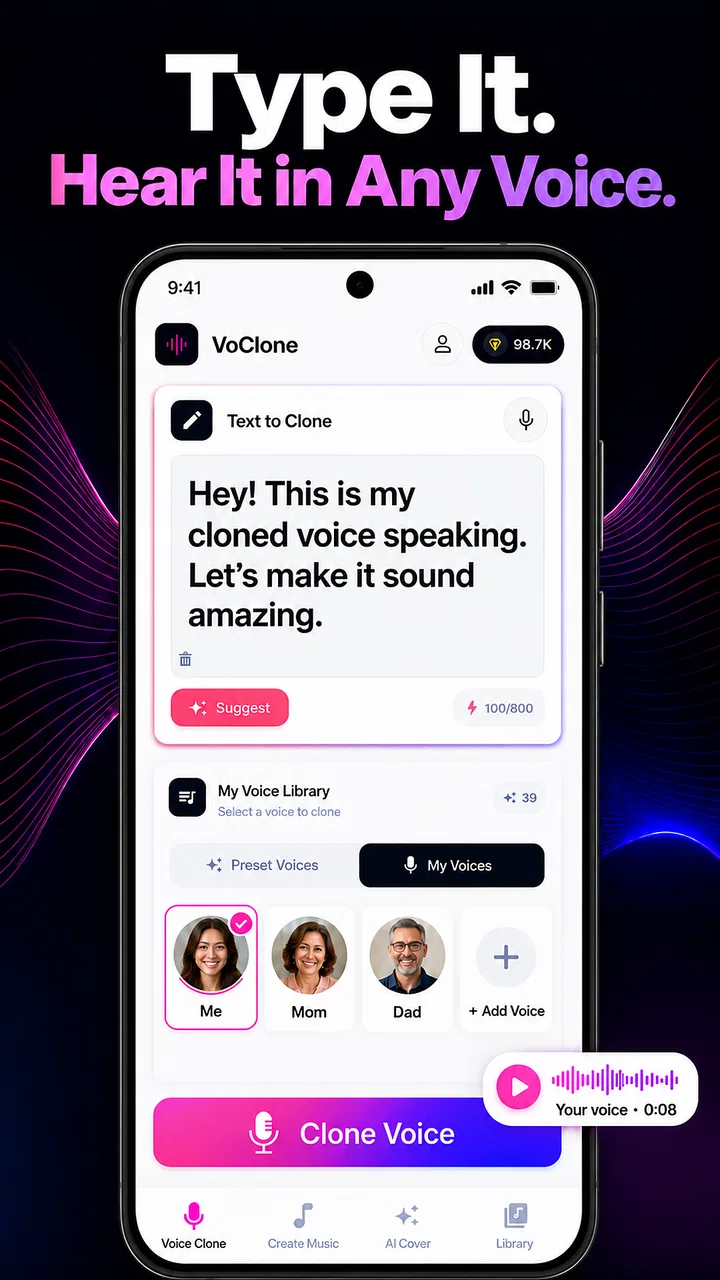
I approached VoClone: AI Voice Changer as a practical music and audio tool rather than a novelty app. Its main appeal is easy to understand: it lets me experiment with cloned voices, AI covers, song creation, and text-to-voice work from a mobile device. That combination makes it more flexible than a simple voice changer, but it also means the quality of the result depends heavily on how carefully I prepare the source material and choose the right workflow.
Developed by Mobover, the app is free to install and aimed at Everyone. It has reached over 50 thousand installs and holds a 4.4 average from around 1.6 thousand ratings, which suggests that many users find the core idea approachable. I found it most interesting when I treated it as a sketchbook for vocal ideas, short creative projects, and playful covers instead of expecting a complete recording studio in my pocket.
Starting with a reliable voice workflow
The first useful habit is to decide what I want before opening the app. VoClone can be used for several different jobs, and each one benefits from a slightly different approach. A text-to-voice experiment is mainly about wording and delivery. An AI cover depends more on the relationship between the song, the vocal line, and the selected voice. A cloned voice project is especially sensitive to the quality and consistency of the source recording.
You May Also Like

 AccuWeather: Weather Radar
AccuWeather Review: A Quick, Clear Forecast for Everyday Decisions
For everyday plans, the best forecast is the one you can understand quickly. AccuWeather makes rain timing, radar, and local conditions easy to act on, with a few trade-offs.

 Hill Climb Racing
Why Hill Climb Racing Still Turns Crashes Into One More Run
A tiny car, a bumpy hill and one more upgrade: Hill Climb Racing keeps resurfacing because its simple chaos makes every near-miss feel personal.

 AliExpress - Shopping App
AliExpress Makes Global Shopping Feel Personal, but Shoppers Bear the Risk
AliExpress turns a global marketplace into a pocket-sized discovery engine. Its reach is useful, its shopping loop compelling, and its trade-offs easy to miss.

 Lords Mobile: Kingdom Wars
Lords Mobile Is a Kingdom-Building Routine, Not a Quick Match
A case-by-case verdict on the building, battles, device demands, and social commitments that make Lords Mobile rewarding for some players and exhausting for others.

 PDF Scanner app - TapScanner
TapScanner Makes Paperwork Easier to Capture, Check, and Share
TapScanner makes scanning with a phone feel less like a rescue operation and more like a dependable step in getting work done. Its capture tools are useful, though not flawless.

 Block Blast!
 Shows How Much a Puzzle Game Can Leave Out
A quiet grid game shows why puzzle players increasingly value instant clarity, repeatable skill and low-pressure play—and where the genre still needs to catch up.
More From Our News Desk
View All News


For a quick test, I would begin with a short, clearly written sentence rather than a full song. This makes it easier to judge pronunciation, pacing, and the overall character of the generated voice. If the result sounds unnatural, I can change one element at a time instead of wondering whether the problem came from the script, the source voice, or the musical arrangement.
That simple approach is more valuable than it may sound. AI audio tools can make it tempting to keep pressing generate until something happens to work. I get better results when I keep a small mental checklist: clean input, simple wording, one creative goal, and a clear reason for changing a setting. VoClone is enjoyable when I use it deliberately; it becomes frustrating when I treat every output as random.
For voice cloning, I would use a recording with a steady distance from the microphone and as little background sound as possible. A quiet room matters because the app is trying to reproduce vocal qualities, not the sound of traffic, a fan, or room echo. I also avoid mixing several speaking styles in the same source. A calm, consistent sample gives me a more dependable starting point than a recording that jumps between whispering, shouting, and casual conversation.
One practical use is preparing a temporary narration for a personal video. I can write the script, test how the voice handles names and punctuation, and then decide whether the tone fits the visuals. This is not the same as recording a polished professional voice-over, but it is useful during the planning stage. I can hear whether a sentence is too long, whether a transition feels awkward, or whether the message needs a warmer or more energetic delivery.
The same workflow works for songwriting experiments. I can use the text-to-voice side to test lyrics before spending time on a full arrangement. If the words sound crowded or the phrasing is difficult to follow, I know the issue is probably in the lyric structure rather than in the final production. That makes the app useful for early ideas, especially when I want to hear a concept instead of leaving it as text in a notes app.
How I judge the first result
I listen for three things before deciding whether a result is worth keeping. First is intelligibility: can I understand every important word? Second is consistency: does the voice remain believable from the beginning to the end? Third is fit: does the voice suit the mood of the script or song? A technically clear result can still feel wrong if the delivery is too bright, too serious, or too dramatic for the material.
I also try the same short phrase more than once when the app allows a generation workflow. The point is not to collect endless versions, but to notice which parts remain stable and which parts change. That tells me whether I should edit the wording or simply choose the most natural take. Saving the strongest version immediately is sensible because creative tools are easier to manage when I do not rely on memory.
For an everyday scenario, imagine that I am making a birthday video for a friend. I could write a brief introduction, test it as spoken audio, and use an AI cover or song idea for the playful middle section. The best result would probably come from keeping the message short, avoiding complicated jokes that depend on perfect pronunciation, and reviewing the output with headphones before adding it to the video. VoClone helps with the creative draft, while the final editing still needs attention elsewhere.
Settings and choices that deserve attention
Even when an app looks simple, the important decisions are often hidden in the preparation rather than in a dramatic control panel. With VoClone, I pay attention to the input before I worry about the output. A strong source recording, a clear script, and a suitable musical idea usually matter more than repeatedly changing options without a plan.
Text formatting is one of the easiest improvements to overlook. I use punctuation to create natural pauses and break long sentences into manageable phrases. I avoid placing several unusual names or technical terms together because that makes it harder to identify the exact pronunciation problem. If a word keeps sounding wrong, I rewrite the sentence around it or spell it in a way that is easier for the voice system to interpret.
For an AI cover, I think about the vocal range and intensity of the original material. A voice that works nicely for a relaxed spoken line may not suit a demanding melody. Rather than judging the voice from one short sample, I test a phrase that represents the song’s real character. A gentle verse and a powerful chorus can expose different weaknesses, so I would not approve a voice after hearing only the easiest section.
Another useful distinction is between a voice that sounds interesting and one that remains usable. A heavily stylized result may be entertaining for a few seconds, but a more restrained voice is often better for narration, repeated listening, or a song where the lyrics need to remain understandable. I prefer to choose the least artificial option that still gives the project its intended personality.
The app is free, but in-app purchases range from $4.99 to $99.99 per item. That makes it important to understand my own usage before spending money. Someone who only wants occasional experiments may be satisfied with the free experience, while a frequent creator may consider paid options if they clearly improve a recurring workflow. I would avoid buying simply because one generation sounds disappointing; first I would check the source, the wording, and the creative direction.
The current version is 3.3.0 and it supports Android 7.0 or later. That broad minimum requirement makes it accessible on many older Android devices, although audio generation can still feel more comfortable on a recent phone with a good connection and enough free storage. I would also use headphones when judging subtle vocal artifacts. Phone speakers can hide a rough transition or make a synthetic tone seem less noticeable than it really is.
Privacy and consent are practical considerations whenever voice cloning is involved. I would only use my own voice or a voice for which I have clear permission. This is not just a matter of good manners; it also keeps the creative process focused on legitimate personal or collaborative work. For a group project, agreeing in advance on how the generated audio will be used is a much better habit than sorting out expectations after publication.
Making comparisons without fooling myself
The usual alternatives in this category tend to specialize. A traditional voice recorder gives me direct control and an authentic performance, but it does not create an AI cover or turn typed words into a selected voice. A conventional audio editor is better for trimming, layering, and detailed cleanup, but it generally requires me to supply the performance myself. VoClone sits earlier in the process: it helps me explore vocal possibilities quickly.
That difference matters. If I need a polished podcast episode, a serious music production, or precise mixing, I would choose a dedicated recorder and editor alongside a real vocalist or instrumental workflow. If I need to hear a concept quickly, compare vocal directions, or make a playful draft, VoClone is more convenient. It is not a replacement for every audio app; it is a shortcut for getting from an idea to an audible experiment.
I also compare results against a normal human recording rather than against an imaginary perfect AI output. A person can react naturally to emotion, timing, and context in a way that generated audio may not. On the other hand, the app is useful when I am working alone, do not have access to a singer, or want to test several directions before asking someone else to perform the final version.
Faster patterns for repeat users
Experienced use is less about finding a magic button and more about reducing avoidable decisions. I keep reusable text structures for common tasks: a short narration, a lyric test, and a simple announcement. These templates help me compare voices fairly because I am not changing the wording every time. Once I know which voice handles a particular style well, I can move faster without sacrificing judgment.
For songwriting, I separate the lyric test from the full creative session. I first check a verse, then a chorus, and only after that do I spend time on a longer version. This catches problems early. If the chorus loses clarity or the rhythm feels crowded, I revise the lyrics before generating another complete attempt. The trade-off is that the final result may still need additional editing, but I waste less time polishing a weak foundation.
For narration, I divide a long script into natural sections. Shorter sections are easier to review, replace, and rearrange. They also make it simpler to fix one awkward sentence without rebuilding the entire project. I keep the tone consistent by writing down the intended mood before starting: friendly, informative, dramatic, or playful. That small note prevents the voice from drifting between unrelated styles.
A helpful shortcut is to create a small comparison set instead of chasing unlimited variety. I might test the same phrase with a few different voice approaches, listen on headphones, and choose the one that best matches the audience. The goal is not to find the most impressive voice in isolation. It is to find the voice that remains comfortable after repeated listening.
I would also review generated audio at normal volume. Increasing the volume can make artifacts seem more dramatic and can encourage me to reject a usable result too quickly. After that, I listen once at a lower level. If the words remain understandable and the tone still feels appropriate, the output is more likely to work in a real video or song draft.
When I use the app with other tools, I treat VoClone as the idea-generation stage. I can prepare the voice or cover concept here, then move to a separate editor for timing, cuts, background music, and final balance. This division of labor is faster than expecting one mobile app to handle every part of production. It also gives me a clearer standard: VoClone needs to provide a convincing vocal starting point, not a finished commercial master.
One non-obvious advantage is that the app can help me make creative decisions before involving other people. If I am unsure whether a lyric sounds sincere or comic, hearing it aloud can reveal the answer immediately. That can save a collaborator from recording material that I later abandon. Used this way, the app is not replacing a performer; it is acting as a private rehearsal partner.
Where the convenience reaches its limits
The biggest limitation is that generated audio can sound less natural when the material becomes complicated. Long sentences, unusual pronunciation, sudden emotional changes, and demanding melodies all increase the chance of an awkward result. I would not build an important project around a single untested generation. The app is better suited to iteration, where I can adjust the input and accept that some attempts will be weaker than others.
Voice cloning also raises an expectation problem. A cloned voice may capture recognizable qualities without reproducing every subtle habit of a real speaker. Breath, emphasis, timing, and emotion can feel different from an actual performance. For a personal joke or rough demo, that difference may be acceptable. For a message that depends on warmth or trust, a real recording can be the better choice.
AI covers have a similar trade-off. They are useful for exploring how a song might feel with another vocal character, but they should not be confused with a complete musical production. The arrangement, instrumental balance, and final mix still determine much of the listening experience. I would use the feature to test direction and mood, then decide whether the idea deserves a more traditional recording process.
There is also a learning curve hidden behind the friendly concept. The app may be easy to open and experiment with, but good results require editing instincts. Users who expect one tap to produce a perfect performance may be disappointed. I found the experience more rewarding once I accepted that the first output is usually a draft and that the real skill lies in choosing better inputs.
The purchase range deserves caution for another reason: creative experimentation can become expensive if I generate without a clear purpose. I set a stopping point for each session and keep only the versions that answer a specific question. If I am testing pronunciation, I do not also change the voice style, song section, and wording at the same time. This habit makes it easier to know whether a paid option would genuinely help my workflow.
I would skip VoClone if my priority is detailed audio engineering, live performance control, or a completely human emotional delivery. A dedicated digital audio workstation, a recorder, or a real singer would be more appropriate in those cases. I would also think twice if I am uncomfortable with AI-generated voices in general. The app’s value comes from synthetic experimentation, so it is not the right tool for someone who wants every vocal decision to come directly from a person.
On the other hand, it is a strong fit for curious beginners, independent creators, lyric writers, short-form video makers, and anyone who wants to hear an idea before committing to a full production. It can also suit experienced users who understand its role and use it to prototype rather than to replace every other audio tool.
My verdict after building a repeatable habit
VoClone: AI Voice Changer works best when I approach it as a fast creative laboratory. Its combination of cloned voices, AI covers, song creation, and text-to-voice experiments gives it more range than a basic effects app. I can move from a rough lyric to an audible draft, test narration before editing a video, or compare vocal personalities without arranging a full recording session.
The strongest results come from repeatable habits: clean source recordings, short test phrases, careful punctuation, separate checks for verses and choruses, and honest listening on headphones. These steps do not make every result perfect, but they make the app much more predictable. They also reveal when the problem is not the generated voice but the script, melody, or expectation behind the project.
My recommendation is therefore specific. Try it if you want a convenient way to prototype vocal ideas and you are willing to revise your inputs. Keep a traditional recorder or audio editor nearby when you need precision, mixing, or a genuinely human performance. I would not treat the app as a finished studio, but I would happily recommend it to a friend who wants to turn a written idea into something they can hear quickly.
As a free Music & Audio app from Mobover, it offers an accessible starting point, while the optional purchases mean regular users should keep their generation habits under control. The Everyone rating makes the concept approachable, but responsible voice use still matters. In my experience, the app earns its place when I use it with a clear purpose: make the first draft faster, then use my own judgement to decide what deserves to become the final piece.
FAQs for VoClone: AI Voice Changer
01What is VoClone: AI Voice Changer and how does it work?
VoClone: AI Voice Changer is a cutting-edge application that allows users to transform their voice using advanced AI technology. By leveraging machine learning algorithms, the app modifies your voice in real-time, offering a wide range of effects and voice styles. Users can select from various presets or customize their own to suit different creative needs.
02Is VoClone: AI Voice Changer compatible with all devices?
VoClone is designed to work on both Android and iOS platforms. However, for optimal performance, it is recommended to use the app on devices with newer operating systems and sufficient processing power. Check the app store for specific compatibility details related to your device model and OS version.
03Are there any privacy concerns with using VoClone?
VoClone takes user privacy seriously. The app does not store or share your voice recordings without consent. All processing is done locally on your device to ensure that your data remains private and secure. Users should always review the app's privacy policy to understand how their data is handled.
04Does VoClone offer in-app purchases or subscriptions?
Yes, while VoClone offers a free version with basic features, there are in-app purchases and subscription options available. These provide access to premium voice effects, advanced customization tools, and an ad-free experience. Check the app’s store page for detailed information on pricing and subscription benefits.
05Can VoClone be used for professional purposes?
VoClone is versatile enough to be used for various creative and professional purposes, such as content creation, podcasts, and voiceovers. However, users should verify the app's output quality and ensure it meets their professional standards. It's advisable to test the features thoroughly before using it in any formal setting.
Pros
- Impressive voice quality transformation.
- Wide range of voice effects available.
- User-friendly interface and design.
- Regular updates with new features.
- Cross-platform compatibility.
Cons
- Limited free version features.
- Occasional lag during processing.
- In-app ads can be intrusive.
- Requires internet for full functionality.
- Some voices sound artificial.

VoClone: AI Voice Changer
Gallery